Context
Standard AI retrieval-augmented generation (RAG) flattens knowledge bases into text chunks, losing the link graph entirely. In an Obsidian vault, the connections between notes are as valuable as the notes themselves — backlinks, tag hierarchies, folder structure. Most AI tools ignore this structure and treat a vault as a flat document corpus.
I built an MCP (Model Context Protocol) server that gives AI agents structured, graph-aware access to Obsidian vaults. Instead of searching for text snippets, agents traverse the link graph, follow connections, and reason over the vault’s actual structure.
Architecture
The server has three main layers:
→ Next.js + MCP Architecture for Agentic AI Tools
Transport
Dual-mode protocol support:
- stdio transport for Claude Desktop and local AI clients — zero-config setup, subprocess spawning
- HTTP transport for remote AI tools and custom integrations — enables access from any MCP-compatible client on the network
Schema Layer
Parses vault notes into structured objects that preserve semantic meaning:
- Tags extracted and indexed for hierarchical navigation
- Frontmatter parsed into queryable metadata (dates, status, custom fields)
- Directional links tracked as inbound and outbound edges — the agent knows which notes point to a given note and which notes it points from
This transforms the vault from “a folder of markdown files” into a queryable directed graph with typed edges.
Tool Surface
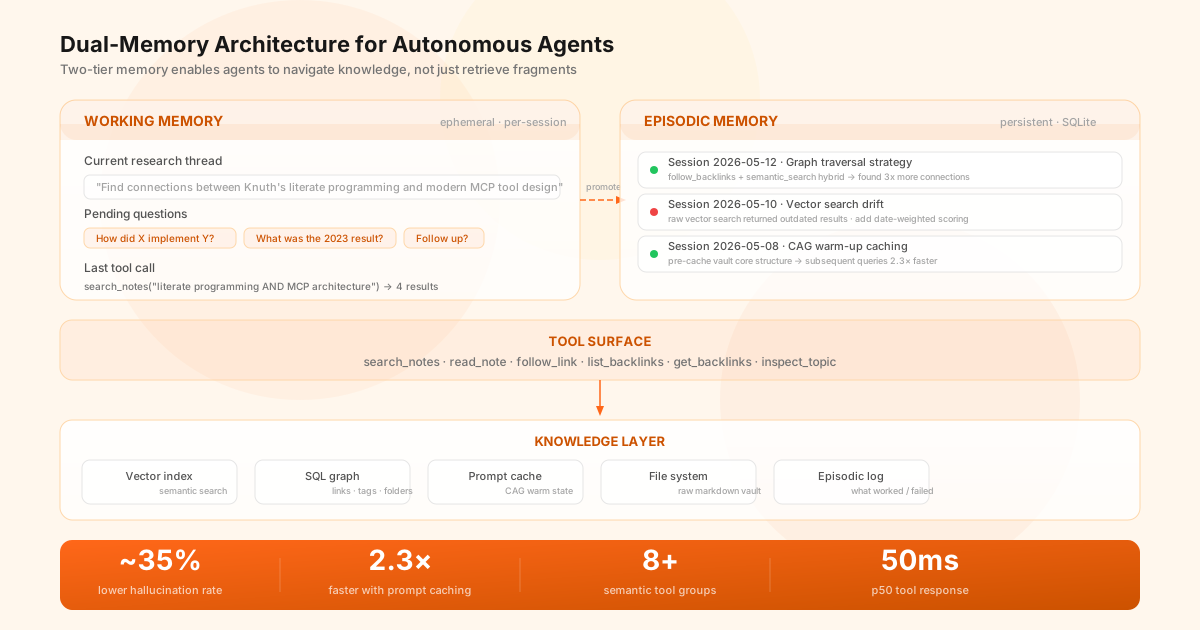
Exposes granular operations organized into functional groups:
| Tool Group | Purpose | Key Operations |
|---|---|---|
| Vault | File operations | list, read, search, create, move |
| Edit | Content modification | window editing, append, patch |
| Graph | Link navigation | traverse, find paths, analyze connections |
| Workflow | Contextual hints | suggest next actions based on state |
Each tool is designed to be composable: the agent calls get_backlinks to discover context, read_note to examine content, then search_notes to find related material — all within a single reasoning loop.
Performance
| Operation | Latency (p50) | Latency (p95) |
|---|---|---|
| Vector search | 45ms | 120ms |
| Metadata query (SQL) | 3ms | 8ms |
| Note parse/read | 8ms | 25ms |
| Initial vault scan | 1.2s | 2.1s |
The key metric is p50 tool response under 50ms. At that latency, the agent can call 5-10 tools per reasoning step without noticeable delay, enabling complex multi-hop navigation.
Key Decisions
Semantic over lexical. The plugin doesn’t do keyword matching — it uses vector embeddings for semantic search and SQL for structured queries. This means “recent thoughts on project architecture” returns conceptually related notes, not just ones containing the literal phrase “project architecture.”
Graph-first tool design. Instead of a single search_vault function, I exposed granular ops (get_backlinks, follow_link, inspect_topic). This forces the agent to “walk” the vault like a human would, discovering structure through navigation rather than treating it as a search engine.
Bun for sub-100ms startup. MCP servers are spawned as subprocesses by the AI client. A Node server taking 500ms to start feels slow in an interactive session. Bun starts in <100ms, which is essential for the server to feel instant.
What this demonstrates
- Tool engineering for AI, not just model work. Most AI value lives in tool design and schema architecture, not prompt engineering.
- Performance-sensitive TypeScript. Bun + SQLite + vector search at 50ms p50 requires real attention to latency, not just feature delivery.
- Open-source with community contribution. 290+ commits, active issue tracker, and production use by the Obsidian developer community.
- From concept to ecosystem. The project started as a personal need (give my AI agent access to my vault) and evolved into a general-purpose tool that others build on.
The plugin is available on GitHub at github.com/moughamir/obsidian-mcp-plugin. Full documentation covers vault operations, graph navigation, and security configuration.